Relive the timeless nostalgia of the classic click wheel. NinoPad's Media layout recreates the tactile wheel navigation, monochromatic LCD display, album art feedback, and crisp haptic clicks for controlling Mac music playback.
1. Live Album Art & Track Info HUD
The top LCD display streams the currently playing song title, artist, album artwork, and time remaining from Apple Music or Spotify on Mac.
2. Virtual Click Wheel Navigation
Rotate your thumb around the wheel to scrub playback positions, adjust output volume, or scroll through playlist menus with authentic momentum.
3. Dedicated Transport Controls
Physical-style tactile buttons for Play/Pause, Next Track, Previous Track, and MENU allow blind-touch playback control while working.
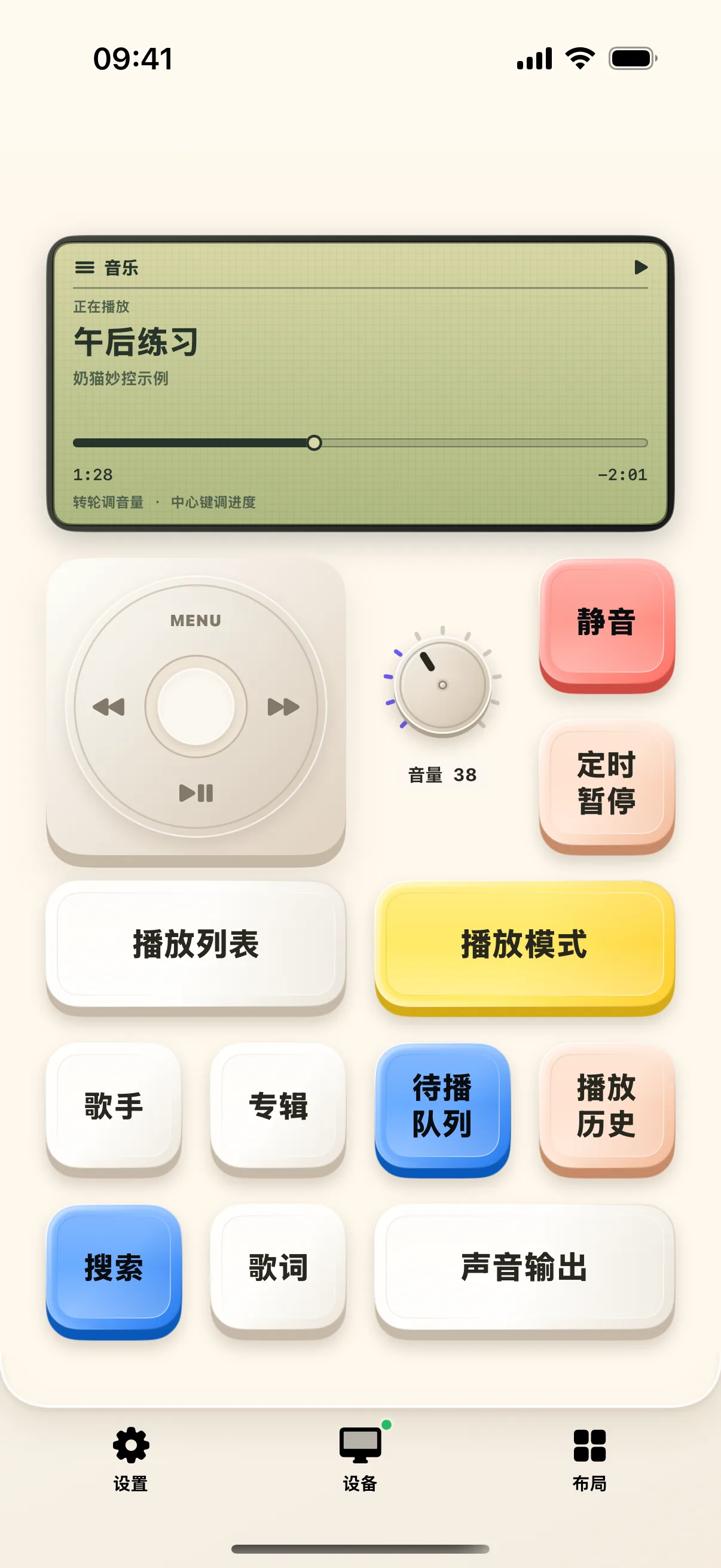
4. Hierarchy Menu & Playlist Selection
Press the MENU button to drill down into playlists, albums, artists, and sound equalizer presets directly from your mobile deck.
Frequently Asked Questions
Which desktop media players are supported for live album art and scrub?
NinoPad supports Apple Music, Spotify Desktop, Tidal, VLC, and IINA with live two-way status and album art sync.
Can I use the click wheel to adjust Mac system master volume?
Yes. Tap the center button on the click wheel to toggle between track scrubbing mode and system volume control.