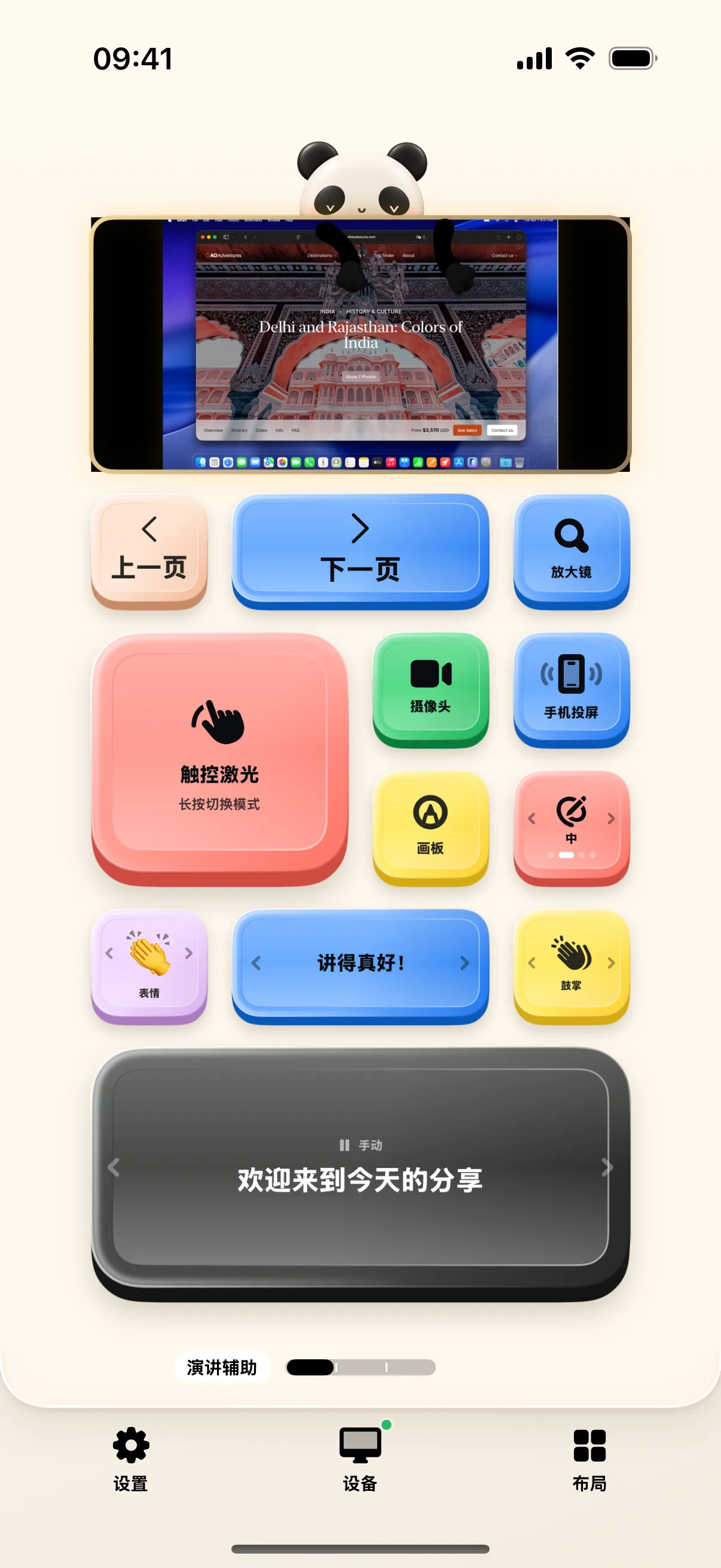
Step away from your laptop and command the room. NinoPad's Presentation layout equips you with a tactile slide remote, instant black-screen button, webcam Picture-in-Picture overlay, and multi-stage rehearsal timer.
1. Blind-Touch Wireless Slide Clicker
Expansive Next and Previous touch zones let you advance slides smoothly while keeping your eyes on the audience.
2. Instant Black Screen & Stage Management
Tap the "Black Screen" button (B) to blank the presentation projector when you want full audience attention during live discussions.
3. Webcam Picture-in-Picture Overlay
Long-press to set floating camera coordinates, then tap to project a clean portrait video feed over your slides during virtual webinars.
4. Rehearsal Split Timer & Pace Tracking
Track intro, main pitch, demo, and Q&A section split times with vibrational milestone alerts that keep you perfectly on schedule.
Frequently Asked Questions
Does the slide clicker work when Mac Keynote is in full-screen presentation mode?
Yes. NinoPad sends system-level presentation events that advance slides seamlessly without needing active mouse focus.
Can I see my presentation speaker notes on the phone?
Yes. In the Presentation Notes desktop, view synced slide speaker notes and section milestones directly on your device.