Experience the joy of playing guitar anywhere. NinoPad's Guitar layout features 6 responsive capacitive strings, realistic acoustic resonance, intuitive thumb chord switching, and over 100 interactive song lessons.
1. Strum the 6 Capacitive Strings
Swipe your right thumb across all 6 strings for a full chord strum, or pluck individual strings for fingerpicking patterns with expressive velocity response.
2. Switch Chords with Virtual Joystick
Move the left thumb joystick in 8 directions to instantly switch between primary diatonic chords (C, Dm, Em, F, G, Am, Bdim) without complex finger contortions.
3. Follow Interactive Lesson Prompts
Open the song library and choose from beginner pop songs, folk ballads, and classic riffs. Follow the falling note indicators to build rhythm and chord timing.
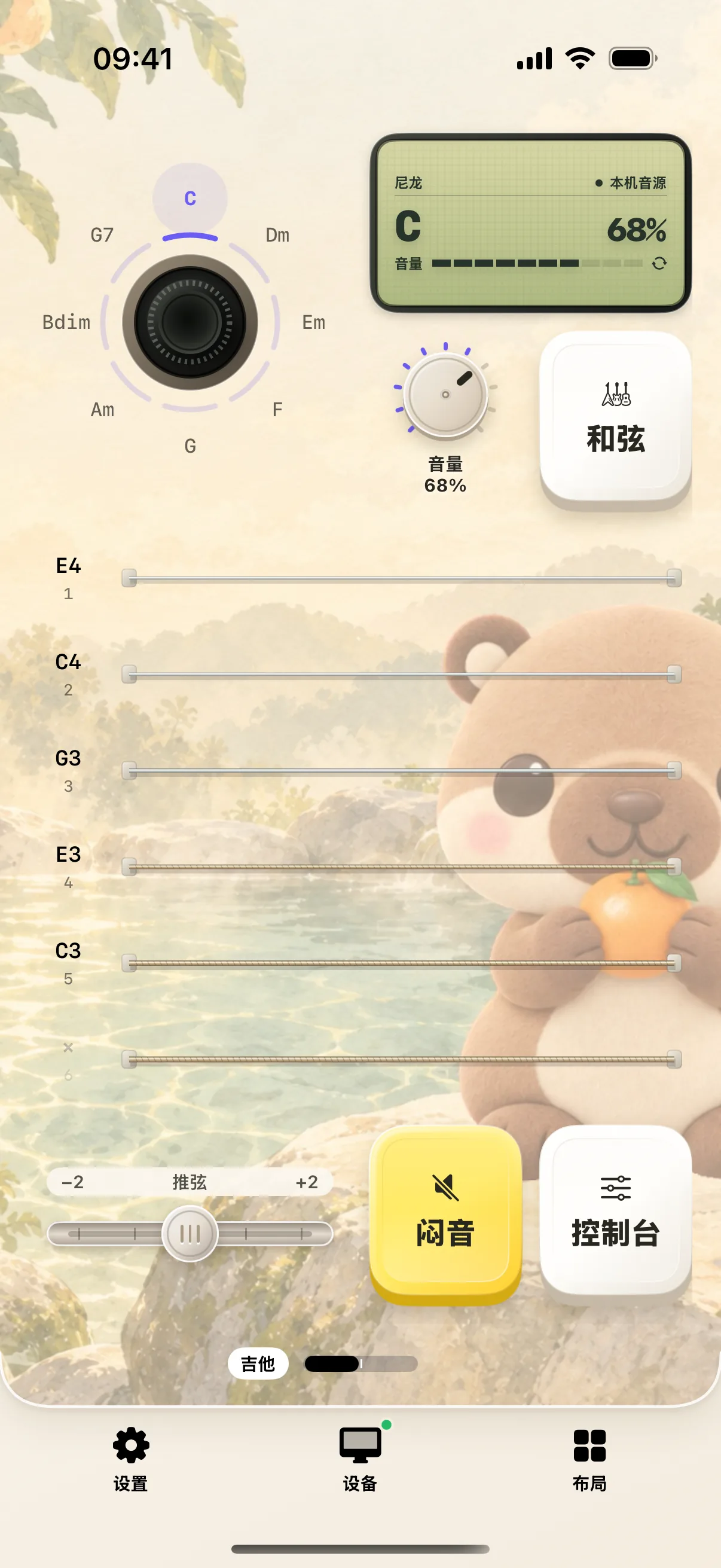
4. Connect to Mac as a MIDI Controller
Play virtual instruments in Logic Pro, GarageBand, or MainStage over wireless Wi-Fi MIDI with ultra-low latency.
Frequently Asked Questions
Can I output guitar notes as MIDI to Logic Pro or GarageBand?
Yes. When paired with your Mac, NinoPad sends standard CoreMIDI messages, allowing you to trigger virtual guitar instruments in Logic Pro, Ableton Live, or GarageBand.
How do I switch between acoustic, classical, and electric guitar tones?
Tap the tone selector at the top-right of the guitar screen to switch between nylon, steel string, clean electric, and overdriven guitar timbres.