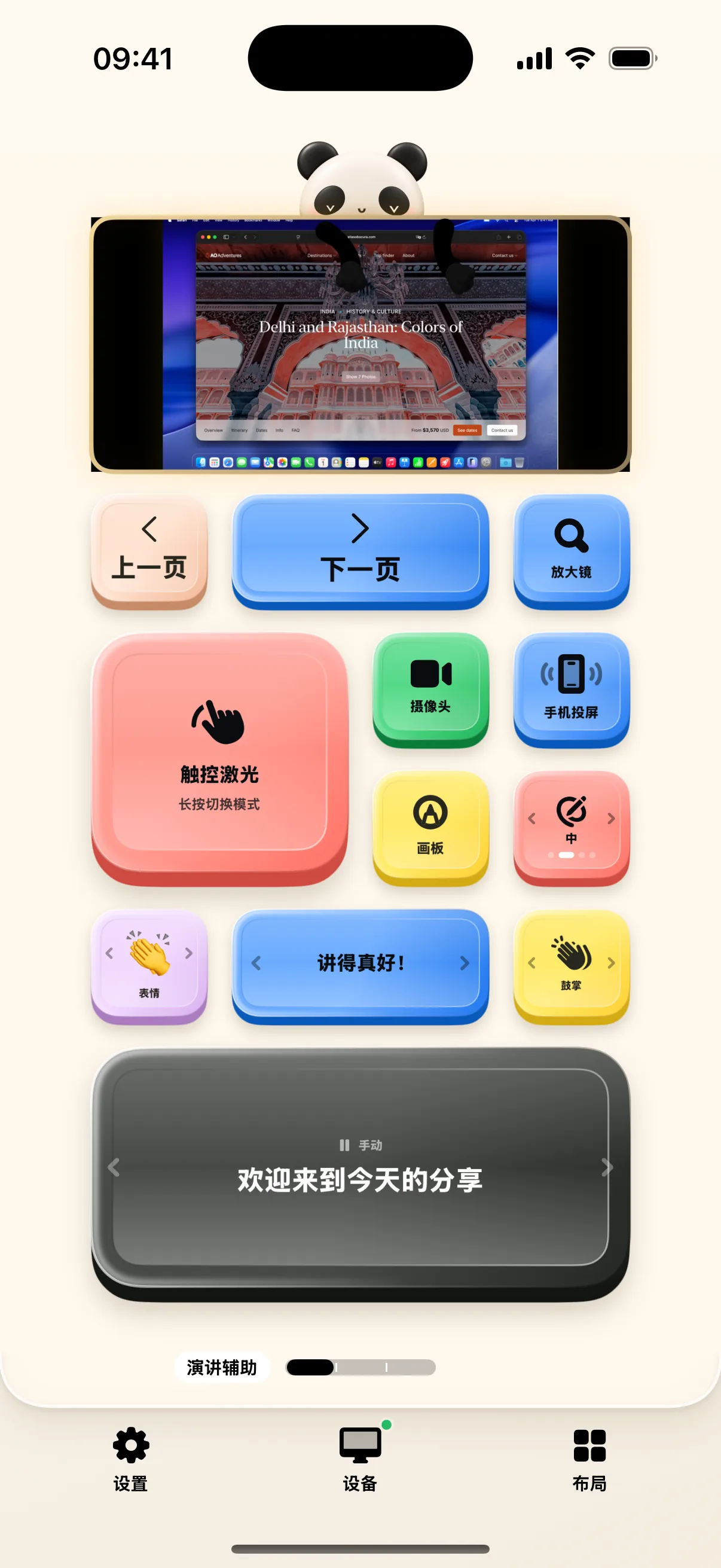
During online webinars or in-person stage presentations, NinoPad's Presentation layout combines wireless slide clicker controls, split rehearsal timers, webcam Picture-in-Picture overlays, and mobile screen broadcasting into a single palm deck, freeing you from podium cables.
1. Wireless Slide Navigation & Black Screen Control
When running Keynote or PowerPoint in full-screen presentation mode on your Mac, NinoPad presents large, high-contrast Forward and Back buttons for blind-touch operation. When you need to pause slides and draw audience attention back to yourself, tap the "Black Screen" button to blank the projector screen temporarily.
2. Webcam Picture-in-Picture Overlay
For virtual presentations or screencasts, long-press the "iPhone Camera" button to customize the floating window position and size on your Mac screen. Tap the button to overlay a crisp portrait camera feed directly over your slides.

3. Mobile Screen Mirroring & Demo Broadcast
When demonstrating a mobile application live, long-press "Screen Mirror" to adjust the floating window frame. Return to the desktop, tap to start broadcasting, and confirm the live feed on your Mac. Tap the stop button to end screen broadcast cleanly.
4. Split Timer & Rehearsal Management
Switch to the "Presentation Timer" desktop and tap "Start". When finishing a section, tap "Lap" to record split times while continuing to the next topic. Tap "Pause" at the end of rehearsal to review cumulative pace and breakdown timings.